"This should be easier 🤔"
Why it took me so long to convert the homelab from Host Profiles to vSphere Configuration Profiles
Time after time, I’d sit down to move my homelab ESX config from Host Profiles into the newer vSphere Configuration Profiles. Time after time, it turned into a confusing mess of overlapping host-override and host-specific settings.
Background
If you have supported ESX/ESXi hosts for a while, you’ve probably encountered Host Profiles. They’re a neat collection of settings that can be applied to a host, a set of hosts, all your hosts, etc. Read more here.
However, with VCF 9.0, Host Profiles were deprecated in favor of the newer, shinier vSphere Configuration Profiles (VCP, since that acronym wasn’t already in use by anything VMware yet). With the move to 9.0, then again with the move to 9.1, I figured it was worth making the transition in my homelab.
My Setup
My homelab consists of four GMKtec K11 hosts running ESX 9.1.1. When this ordeal started, they were running ESXi 8.0.3, and have since been upgraded to 9.0, rebuilt at 9.0, and upgraded to 9.1. It’s a lab, so they get some labbing. Every time, I wound up giving up on VCPs and going back to Host Profiles just to get things working.
Three of the hosts were purchased in one order from Amazon a while back, and another directly from GMKtec more recently, thanks to 9.1’s heftier hardware requirements. RAM prices being what they are, I made the call to add a fourth host rather than just buy memory for one of the existing ones. The price worked out pretty much the same, but I got more cores along with the memory.
The Problem
Like Host Profiles before them, VCPs can easily be pulled from a single host that’s configured correctly. For nearly two decades, I’ve done this with Host Profiles without a second thought. However, I tried several times to make the conversion to VCPs, and it always failed during the step to import the VCP configuration from my existing host.
The errors fell under two sections: esx/network/net_stacks and esx/network/vmknics.
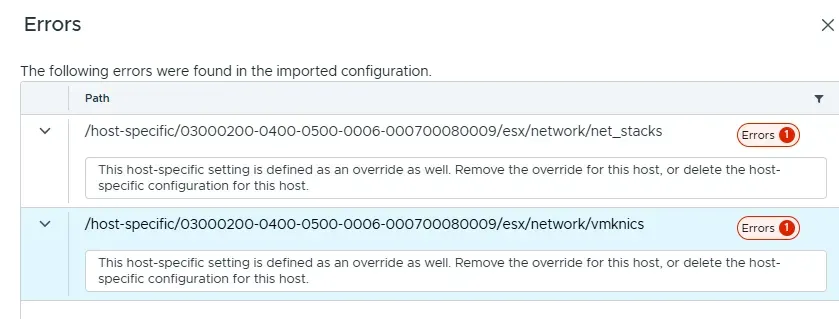
The problem seemed to be that the same settings were being defined under host-override and host-specific settings in the JSON. While I can see how this is a problem, it seemed silly that it’s both a problem and something the automatically generated file would do. Every time, I wrote it off as a quirk of vSphere and just went back to my ol’ reliable Host Profiles, since the whole point was to configure things quickly, not fiddle with JSON.
For months, I assumed everyone had just sat down and manually created a viable config by editing a JSON file to carefully enter the IP addresses in the host-specific section, since the import functionality would duplicate it into the host-override section, thus breaking the whole thing.
I was complaining about this to a colleague on a random Tuesday afternoon, and he had no idea wtf I was talking about. That was the first time it clicked that it might not be just a quirk of vSphere, but something actually not working as intended.
This led to a targeted troubleshooting session with Claude, which actually started with me trying to manually build out the JSON by gathering all of the basic details via PowerCLI. The aha moment came when I ran the snippet below to gather the UUIDs, which is how the hosts are individually identified by the VCP:
Get-VMHost | Sort-Object Name | Select-Object Name, @{N='BiosUuid';E={$_.ExtensionData.Hardware.SystemInfo.Uuid}}This returned the surprising output:
Name             BiosUuid
----             --------
host-a.lab.local b2558f00-3865-11f1-8c12-d0f4cc4b8100
host-b.lab.local 03000200-0400-0500-0006-000700080009
host-c.lab.local 03000200-0400-0500-0006-000700080009
host-d.lab.local 03000200-0400-0500-0006-000700080009
After arguing with Claude a bit about the obviously broken command, it clicked that the command was returning the actual UUID, but wasn’t living up to the unique U. After some research, it turns out that 03000200-0400-0500-0006-000700080009 is a default UUID for quite a few motherboards, including mine.
It all boiled down to vSphere seeing three of my hosts as the same host because they had the same UUID. The VCP was choking on trying to configure one host with three different sets of network settings.
The Fix
While there are some tools that could change the UUID, there is a risk with mucking around at the BIOS/firmware levels that I wasn’t looking to take on just to make the move off of Host Profiles.
Instead, I pulled some inspiration from William Lam’s blog and opted to just simulate it. This isn’t an approach I’d take in production, but this also isn’t the sort of problem I’d expect to encounter in production.
- I started by connecting to a host via SSH and capturing the existing values with
vsish -e get /hardware/bios/dmiInfo. - While connected, I also edited
/bootbank/boot.cfgto appendignoreHwSMBIOSInfo=TRUEto thekerneloptline. - I then edited
/etc/rc.local.d/local.shto add these two lines above theexitline, using Claude to correctly format the contents of{...}based on the output of step 1. Claude was kind enough to generate the new UUIDs for me as part of this step.vsish -e set /hardware/bios/dmiInfo {\"NucBox K11\", \"GMKtec\", \"Default string\", [57, 203, 91, 14, 238, 120, 11, 76, 170, 49, 3, 219, 145, 88, 230, 42], \"Default string\", 6, \"K11-003\", \"MINI\"} /etc/init.d/hostd restart - I ran
/sbin/auto-backup.shto get the changes to re-run on boot. - Rebooted the host.
- Repeated the steps for the remaining hosts.
I was then able to re-run the first PowerCLI bit and confirmed my hosts now have unique UUIDs. At that point, following the docs to enable VCPs on my existing cluster was straightforward and actually worked as expected.
I’m not sure how common this one will wind up being, but I’m definitely paying some attention to how unique my unique IDs are from now on and will be adding “try building the JSON from scratch” early in my VCP troubleshooting repertoire, just in case.
References
- Broadcom KB 413825 | Duplicate UUIDs Observed Across ESXi Hosts in Multiple vCenter Environments
- Broadcom TechDocs | Enable vSphere Configuration Profiles on an Existing Cluster
- Broadcom TechDocs | Using vSphere Configuration Profiles to Manage Host Configuration at a Cluster Level
- Broadcom TechDocs | VCF 9.0 Release Notes: vSphere Product Support Notes
- Broadcom TechDocs | What Are vSphere Host Profiles
- Broadcom TechDocs | Working with Configuration Documents and Configuration Schemas
- VCF Blog | Transitioning to VMware vSphere Configuration Profiles from Host Profiles
- William Lam | Easier method to simulate custom ESXi SMBIOS hardware strings